

Beskrywing
Softech Addons for Elementor is a comprehensive collection of powerful and performance-optimized widgets designed to supercharge your Elementor page building experience. Create stunning websites with advanced design elements, interactive components, and conversion-focused widgets-all without writing a single line of code.
Transform your WordPress site with 21 free premium-quality widgets including Loop Grid Slider, Image Accordion, Testimonial Slider, Mega Menu, Stripe Checkout integration, Theme Builder, Post Title, Post Content, Post Thumbnail, Post Navigation, Author Box, Post Meta and many more. Perfect for blogs, business websites, portfolios, building header & footer, e-commerce stores, landing pages, and creative agencies.
🆕 GSAP Animations – Transform your site with cinema-quality animations! Add scroll-triggered effects to ANY Elementor element without writing code. Features include:
* 14 Entrance Animation Presets – Fade, slide, scale, rotate with full control over duration, delay, easing, and scroll triggers
* Split Text Animations – Animate headings character-by-character or word-by-word with global or per-element control
* Stacking Cards Effect – Create stunning sticky scroll stacking for child elements
* Performance Optimized – Scripts load only on pages using animations for lightning-fast performance
* Improved Stability – Multiple animation bugs resolved for smoother, more consistent behavior across all browsers and devices
🆕 Now with built-in Theme Builder – No Elementor Pro required! Theme Builder lets you design and apply custom layouts across your website using Elementor. Easily create headers, footers, single posts, 404 page, and archive templates without coding. With powerful display conditions, you can control exactly where each design appears-across the entire site or specific pages. Build once and reuse anywhere, ensuring a consistent and professional look. Perfect for dynamic websites that need flexibility and precise design control.
Why Choose Softech Addons for Elementor?
- Lightning Fast Performance – Optimized code with intelligent caching for maximum speed
- 100% Responsive & Mobile-Ready – All widgets look perfect on any device
- Easy Drag & Drop – Works seamlessly with Elementor’s visual editor
- No Coding Required – Create professional designs instantly
- Built-in Header & Footer Builder – No Elementor Pro needed for header/footer layouts
- Regular Updates – Continuous improvements and new features
- Premium Support – Dedicated assistance when you need it
- SEO Friendly – Clean, semantic code that search engines love
- Translation Ready – Fully compatible with multilingual sites
PERFECT FOR:
- Business Websites – Showcase services, testimonials, and case studies
- E-commerce Stores – Product grids, pricing tables, and payment integration
- Creative Portfolios – Image galleries, before/after comparisons, and project showcases
- Blogs & Magazines – Post sliders, content grids, and engaging layouts
- Landing Pages – Call-to-action sections, statistics, and conversion elements
- Corporate Sites – Team profiles, company stats, and professional menus
- Agencies – Client testimonials, portfolio grids, and service displays
Explore live demos and documentation at Softech Addons Official Website
PREMIUM PRO VERSION AVAILABLE
Unlock even more powerful features with Softech Addons Pro
KEY FEATURES:
- Compatible with any WordPress theme
- Works with Elementor Free & Pro
- Built-in Header & Footer Builder (no Elementor Pro required)
- Fully customizable design controls
- Advanced typography settings
- Custom color schemes
- Animation and hover effects
- Cross-browser compatibility
- GDPR compliant
- Lightweight and optimized code
- Regular security updates
- Developer-friendly with hooks and filters
TECHNICAL HIGHLIGHTS:
- Built with modern PHP standards
- Object-oriented architecture
- Modular widget structure
- Efficient database queries with caching
- Lazy loading for images
- Minified assets for faster loading
- Compatible with WordPress 6.0+
- PHP 7.4+ required
- Follows WordPress coding standards
EXTENSIVE DOCUMENTATION & SUPPORT
Get started quickly with our comprehensive guides, video tutorials, and responsive support team. Whether you’re a beginner or advanced user, we’re here to help you create amazing websites.
TRUSTED BY THOUSANDS
Join the growing community of web designers, developers, and agencies who rely on Softech Addons to build beautiful, high-performing websites.
View Live Demos | Get Pro Version | Documentation | Support
How to Use Elementor Template Kit In Our Widgets
You can use templates in the Loop Grid Slider widget and Testimonial widget. When a template layout is selected, the Edit Template button becomes available in the widget options. If you need to edit the template, click the button to quickly navigate to the template inside the Template Library.
Browser Compatibility
Softech Addons is fully compatible with all modern browsers including Chrome, Firefox, Edge, and Opera. All widgets are tested for cross-browser consistency and responsive behavior.
Third-Party Integrations
- Stripe – Secure payment processing
- Elementor – Core page builder integration
- Swiper.js – Smooth slider animations
- GSAP – Advanced animation library
- WordPress Media Library – Seamless image management
Free Widgets:
- Loop Grid Slider
- Testimonial Slider
- Before After Slider
- Blob Shapes
- Flip Card
- Image Accordion
- Number Box
- Dual Color Heading
- PDF Viewer
- Stripe Checkout
- Mega Menu
- Post Timeline
- Site Logo
- Tabs & Accordion
- Filterable Gallery
- Post Title
- Post Content
- Post Thumbnail
- Post Navigation
- Author Box
- Post Meta
How to Use Elementor Template Kit In Our Widgets
You can use templates in the Loop Grid Slider widget and Testimonial widget. When a template layout is selected, the Edit Template button becomes available in the widget options. If you need to edit the template, click the button to quickly navigate to the template inside the Template Library.
Pro Version
Want more powerful widgets and premium templates?
Get Softech Addons for Elementor Pro for exclusive features and advanced design tools.
Pro Widgets:
Widgets Short Description:
1. Loop Grid Slider
Loop Grid Slider – A powerful and free Elementor grid slider widget. This widget can be used to showcase posts, products, portfolios, testimonials, or any custom content in a continuous loop layout. Supports multiple styles including carousel mode, multi-column layouts, card-style grids, responsive controls, autoplay, navigation arrows, and pagination options. Perfect for blog posts, listings, or dynamic content presentations with smooth transitions and full design flexibility.
2. Testimonial Slider
Testimonial Slider – A clean and feature-rich Elementor widget for displaying customer reviews in a slider format. Ideal for showcasing client feedback, star ratings, user photos, and detailed testimonials. Now updated with new layout variations, enhanced styling options, improved autoplay controls, additional skin designs, and several bug fixes for smoother rendering. Comes with avatar customization, loop mode, and elegant transitions. A perfect solution for trust-building sections on business, agency, or service-based websites.
3. Before After Slider
Before After Slider – An interactive Elementor image comparison widget. Allows users to drag a handle to compare two images side by side. Great for displaying transformations, edits, renovations, medical results, beauty treatments, restoration work, and more. Includes vertical/horizontal modes, label options, smooth animations, overlay styling, and full responsiveness.
4. Blob Shapes
Blob Shapes – A creative Elementor widget that generates organic, fluid-shaped blobs for modern website designs. Can be used as decorative elements, background highlights, image masks, or graphic accents in hero sections. Supports random shape generation, color controls, gradient backgrounds, SVG output, and full styling options to match your brand theme.
5. Flip Card
Flip Card – An interactive Elementor widget where the card flips on hover or click to reveal additional content. Ideal for service listings, team profiles, features, pricing boxes, or promotional content. Includes front/back design controls, flip directions, 3D animations, icons, images, and full typography customization.
6. Image Accordion
Image Accordion – A modern Elementor accordion made entirely of images. Expands smoothly on hover or click, revealing titles, descriptions, and call-to-action buttons. Perfect for galleries, category showcases, portfolios, headers, and storytelling layouts. Supports vertical/horizontal layouts, overlay colors, image effects, and advanced animation controls.
7. Number Box
Number Box – A simple and stylish Elementor widget for highlighting key numbers such as statistics, achievements, milestones, and business metrics. Includes icons, headings, number animations, description text, and customizable box layouts. Great for about pages, company highlights, service sections, and infographic-style displays.
8. Dual Color Heading
Dual Color Heading – An advanced heading widget for Elementor that lets you highlight specific words in a different color. Useful for hero titles, section headings, and marketing content. Includes typography controls, alignment options, gradient text, text backgrounds, and responsive design settings to enhance visual emphasis.
9. PDF Viewer
PDF Viewer – A convenient Elementor widget that displays PDF files directly on your webpage. Perfect for documents, menus, brochures, reports, forms, catalogs, or manuals. Supports zoom controls, scroll view, thumbnail navigation, and responsive adjustments. Eliminates the need for third-party PDF plugins or external viewer windows.
10. Stripe Checkout
Stripe Checkout – A powerful Elementor widget for seamless payment processing and e-commerce integration. Enables you to embed Stripe payment forms directly on your website for selling products, services, or accepting donations. Includes customizable button styling, product selection, pricing options, secure payment handling, and automated transaction notifications. Supports many currency options for global transactions. Perfect for online stores, membership sites, service providers, and fundraising campaigns with full PCI compliance.
11. Mega Menu
Mega Menu – An advanced Elementor navigation widget for creating professional mega menus with multiple columns, rich content, and custom layouts. Ideal for large e-commerce sites, corporate websites, and complex navigation structures. Supports image integration, custom widgets, submenu hierarchies, hover effects, responsive mobile menus, search functionality, and advanced styling options. Enhances user experience with organized, visually appealing menu systems that improve site navigation.
12. Post Timeline
Post Timeline – The Post Timeline widget lets you create stunning vertical and horizontal timelines directly inside Elementor – no coding required. Whether you’re building a company history, a blog post archive, a product roadmap, or a step-by-step process, this widget handles it all with flexible source options and rich styling controls.
13. Site Logo
Site Logo – A professional Elementor widget for displaying your website or brand logo with advanced customization options. Includes support for retina-ready images, SVG logos, custom sizing controls, alignment options, hover effects, and clickable logo functionality. Perfect for headers, footers, or anywhere you need branded imagery with responsive design capabilities.
14. Tabs & Accordion
Tabs & Accordion – Feature-rich Tabs & Accordion widget designed for flexible content display. Easily switch between tabbed and accordion layouts with support for dynamic content, query-based data, autoplay, horizontal scrolling, and both horizontal & vertical orientations-ensuring a responsive and user-friendly experience across all devices.
15. Filterable Gallery
Filterable Gallery – A versatile Elementor gallery widget with three powerful display modes. Basic Gallery mode lets you create beautiful image grids with lightbox support, custom columns, hover effects, and spacing controls. Filter Gallery mode adds interactive category filtering with smooth animations and customizable filter buttons. Dynamic Gallery mode leverages WordPress query builder to automatically populate galleries from posts, pages, or custom post types with taxonomy-based filtering. Now updated with new layout options, improved filter animation behavior, additional hover styles, and several bug fixes for more consistent rendering. Perfect for portfolios, product showcases, team displays, client logos, and any content requiring visual organization with optional filtering capabilities. Includes lazy loading, responsive layouts, and extensive styling options.
16. Post Title
Post Title – A dynamic Elementor widget for displaying the title of the current post, page, or custom post type within Theme Builder templates. Supports full typography controls, custom HTML tags (H1-H6, div, span, p), link options, alignment settings, and color customization. Ideal for use in Single Post and Single Page templates where a dynamic, context-aware title is required.
17. Post Content
Post Content – An essential Elementor widget that dynamically renders the full content of the current post or page inside your Elementor-designed templates. Works seamlessly within Theme Builder’s Single Post and Single Page templates. Supports custom typography, padding controls, and content alignment to ensure your post content integrates perfectly with your overall page design.
18. Post Thumbnail
Post Thumbnail – A dynamic Elementor widget for displaying the featured image of the current post or page. Supports multiple image sizes, custom aspect ratios, border-radius controls, box shadow, hover effects, and optional link-to-post functionality. Perfect for use in Single Post templates, archive cards, or any layout where dynamic featured image display is needed.
19. Post Navigation
Post Navigation – An Elementor widget for adding previous and next post navigation links to your single post templates. Fully customizable with label text, separator styling, arrow icon options, typography controls, and color settings for default and hover states. Keeps readers engaged by providing intuitive in-context navigation between posts within the same site or taxonomy.
20. Author Box
Author Box – A stylish Elementor widget for displaying a detailed author profile section within post templates. Includes author avatar with shape and size controls, author name, bio/description, and social media links. Fully customizable with typography settings, background options, border controls, and spacing adjustments. Ideal for blogs, news sites, and multi-author publications to build credibility and encourage author discovery.
21. Post Meta
Post Meta – A flexible Elementor widget for displaying dynamic post metadata including publish date, last modified date, author name, categories, tags, comments count, and reading time. Each meta item supports individual icon selection, label customization, typography controls, and color settings. Supports both inline and stacked layout modes. Perfect for post headers, archive cards, and single post templates where contextual information enhances the reading experience.
22. Post Comments (Pro)
Post Comments – An elegant Elementor widget for showcasing WordPress comments with complete design control. Features nested comment threading, avatar customization, reply buttons, comment forms, and moderation options. Includes styling controls for borders, spacing, typography, and colors. Perfect for blog posts and discussion-based content requiring engaging user interaction.
23. Call To Action (Pro)
Call To Action – A conversion-focused Elementor widget designed to create compelling action blocks. Includes support for attention-grabbing headlines, persuasive descriptions, customizable buttons, background images, gradient overlays, and animated elements. Ideal for landing pages, promotional sections, lead generation campaigns, and marketing funnels with multiple layout variations.
24. Image Shapes (Pro)
Image Shapes – An advanced Elementor widget for applying creative geometric and organic shapes to images. Supports circles, polygons, custom SVG masks, blob shapes, and morphing effects. Includes border controls, shadow options, hover transformations, and overlay effects. Perfect for modern portfolio galleries, team member displays, product showcases, and creative visual presentations.
25. Popup Widget (Pro)
Popup Widget – A versatile Elementor widget for creating sophisticated modal popups and lightboxes. Features multiple trigger options (click, scroll, exit intent, time delay), animation effects, close button customization, overlay controls, and responsive sizing. Ideal for newsletters, promotions, video embeds, contact forms, special offers, and user engagement campaigns.
26. Progress Bars (Pro)
Progress Bars – A dynamic Elementor widget for visualizing skills, statistics, project completion, or any progress-based data. Features horizontal/vertical orientations, multiple bar styles, animated fills, percentage displays, custom colors, gradient fills, and icon support. Perfect for about pages, portfolio skills sections, fundraising campaigns, course progress tracking, and data visualization.
Credits
This plugin bundles the Swiper library (https://swiperjs.com/) licensed under the MIT license.
This plugin bundles …
Screenshots

Admin 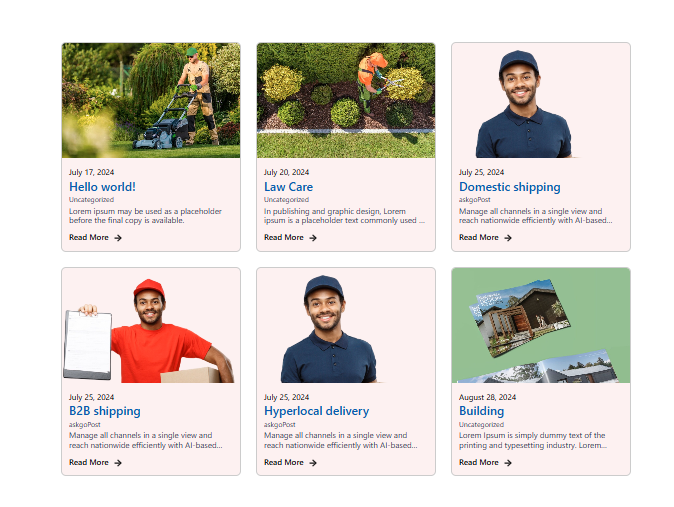
Loop Slider widget demo 
Image Accordion widget 
Testimonial 
Blob Shapes 
Before After Slider 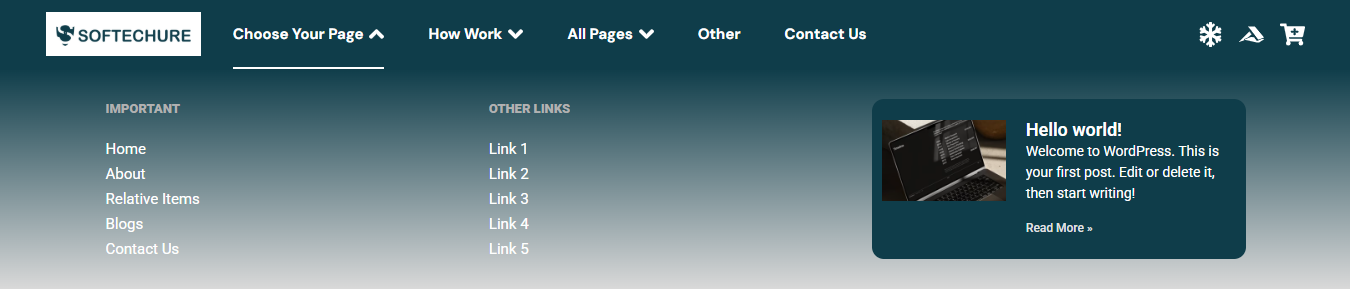
Mega Menu 
Stripe Checkout 
Theme Builder 
Filterable Gallery 
Tabs & Accordion
Installation
- Upload the plugin files to the
/wp-content/plugins/softech-addons-for-elementordirectory, or install it through the WordPress plugin screen directly. - Activate the plugin through the ‘Plugins’ menu in WordPress.
- Ensure Elementor is installed and activated.
- Navigate to Elementor Editor and explore the new widgets.
- If you have any questions, please check out the FAQ page or contact us via our Contact form.
Kwel-vrae
-
If something isn’t addressed here, how can we connect with you?
-
You’re welcome to message us anytime using our Contact form.
-
Does this require Elementor Pro?
-
No. All widgets, including the Mega Menu, work completely with the free version of Elementor. As of version 1.1.2, we have introduced our own built-in Theme Builder, so you no longer need Elementor Pro’s Theme Builder to place your Mega Menu (or any other widget) in your site’s header or footer. Simply use our Header & Footer Builder from the plugin settings Theme Builder tab to design and assign your header and footer templates – no Elementor Pro subscription required.
-
Where can I find the new widgets after installation?
-
Once activated, the new widgets (like Loop Grid slider, Testimonial Slider, Before After Slider, etc.) will appear in the Elementor Editor panel under a dedicated section called “Widgets”.
-
Will your plugin affect the performance of my site?
-
We run tests to ensure the speed of the site is not affected when you activate our Elementor addons. We provide a way for you to deactivate those Elementor modules that you do not require for your site to avoid loading them unnecessarily on the pages.
-
Does it work with any theme?
-
YES! It will work with any theme where Elementor works.
-
Your existing Elementor elements & content will work with premium version. So you won’t lose your developed contents or any elementor elements.
Aanbevelings
There are no reviews for this plugin.
Contributors & Developers
“Softech Addons for Elementor” is oopbron sagteware. Die volgende mense het bygedra tot die ontwikkeling van hierdie uitbreiding:
Contributors

Translate “Softech Addons for Elementor” into your language.
Interested in development?
Browse the code, check out the SVN repository, or subscribe to the development log by RSS.
Changelog
1.2.1
- New Widgets Added: Introduced 6 new Theme Builder widgets – Post Title, Post Content, Post Thumbnail, Post Navigation, Author Box, and Post Meta
- Advanced Tab Enhancement: Added Sticky option in Elementor Advanced tab for better layout control and positioning
- Header & Footer Builder: Improved core structure, rendering performance, and overall stability of header & footer templates
- Testimonial Slider: Code optimizations, improved rendering consistency, and better autoplay + layout handling
- GSAP Animations: Fixed multiple animation bugs related to scroll triggers, split text, and stacking cards behavior
- GSAP Animations: Improved initialization on dynamic/AJAX-loaded content and smoother easing transitions
- Filterable Gallery: Added masonry layout, new hover effects, and improved filter behavior consistency
- Filterable Gallery: Fixed taxonomy query issues and lightbox navigation bugs
- Compatibility: Tested with latest WordPress (6.9) and Elementor versions
- Performance: General code improvements and minor optimizations across multiple widgets
1.2.0
- New Widget: Filterable Gallery – Introduced powerful multi-mode gallery widget with Basic Gallery, Filter Gallery, and Dynamic Gallery (query-based) display options
- GSAP Animations: Added professional scroll-triggered animation system with 14 entrance presets, split text effects, and stacking cards – applies to any Elementor element
- Performance: GSAP scripts load conditionally only on pages using animations
- Animation Controls: Full customization of duration, delay, easing, scroll triggers, and animation behavior
- Split Text: Character-by-character and word-by-word text animation with global and per-element settings
- Stacking Effect: Sticky scroll stacking for creating engaging card-stack interactions
- Gallery Features: Lightbox support, taxonomy filtering, query builder integration, and responsive grid layouts
- Compatibility: Tested and verified with WordPress 6.9 and Elementor latest versions
1.1.5
- Theme Builder: Resolved minor bugs for improved stability and rendering consistency.
- Stripe Transaction Table: Introduced CSV export functionality, allowing users to download full or filtered transaction data directly from the table.
- Stripe Transaction Table: Added advanced filtering options to refine transaction records with the ability to export filtered results.
- Tabs & Accordion: Merged the Tabs and Accordion widgets into a single, unified widget with expanded functionality and greater design flexibility.
1.1.4
- Theme Builder Redesign: Completely overhauled the Theme Builder interface with a cleaner, more intuitive design for an improved user experience.
- Tabs Feature: Introduced a tabbed layout within the Theme Builder for better organization and easier navigation between template types.
- New Template Types: Expanded template support to include Archive, Single Page, Single Post, and 404 Page templates – giving you full site-wide design control.
- Mega Menu: Resolved several bugs affecting menu rendering, layout consistency, and overall stability.
- Post Query: Fixed multiple issues with post query logic in the Mega Menu, ensuring accurate and reliable content loading.
- Performance: Various under-the-hood improvements to reduce overhead and improve responsiveness across the Theme Builder.
1.1.3
- Pre-Built Templates: Added a library of ready-made header and footer templates that can be inserted directly into your site’s header or footer with a single click – no design work required.
- Template Library: Pre-built templates are fully compatible with the built-in Header & Footer Builder introduced in v1.1.2.
- Customization: All pre-built templates remain fully editable within Elementor after insertion, allowing complete design flexibility.
- Usability: Streamlined the template selection and insertion workflow for a faster, more intuitive setup experience.
- Compatibility: Ensured all pre-built templates work seamlessly across supported themes and screen sizes.
- Bug Fixes: Minor stability and rendering improvements across the Header & Footer Builder.
1.1.2
- New Feature: Built-in Theme Builder for Header & Footer – Introduced our own custom Header & Footer Builder, completely eliminating the dependency on Elementor Pro’s Theme Builder. You can now design and assign header and footer templates directly from the plugin, using the free version of Elementor.
- Mega Menu: Now fully functional in site headers and footers without requiring Elementor Pro. Works seamlessly with the new built-in Header & Footer Builder.
- New Plugin: Introduced companion plugin Post Timeline – a dedicated WordPress timeline widget for displaying posts in beautiful vertical and horizontal timeline layouts.
- Compatibility: Improved overall compatibility and stability across all widgets with the new header/footer system.
- Code Quality: Refactored header/footer registration and rendering logic for better performance and maintainability.
- Theme Builder: Configure header and footer designs and control where they appear using display conditions.
1.1.1
- Security: Clarified and hardened frontend output handling for Elementor-rendered content to align with best practices and avoid potential XSS warnings
- Code Quality: Added explicit documentation and PHPCS directives where Elementor output is intentionally unescaped
- Stability: Minor internal refactoring with no functional or UI changes
- Compatibility: Improved compatibility with security scanners and code review tools
- Maintenance: General cleanup and consistency improvements across Stripe and frontend rendering logic
1.1.0
- Major Performance Improvements: Implemented unified caching layer to significantly reduce database queries and improve page load times
- Optimization: Refactored testimonial widget queries with intelligent caching for faster template loading
- Enhancement: Improved helper function performance with proper cache management for pro widgets information
- Database: Added strategic indexes to payment tables for faster query execution and improved data retrieval
- Security: Implemented rate limiting on payment endpoints to prevent abuse and enhance transaction security
- Asset Management: Fixed asset registration pattern across all widgets to prevent redundant loading and improve efficiency
- Code Quality: Removed unnecessary init hooks from Stripe Checkout widget, reducing server overhead
- Styling: Moved inline CSS to external files for better caching and faster subsequent page loads
- Image Optimization: Added lazy loading attributes to all widget images for improved initial page load performance
- Developer Tools: Added performance monitoring class for debugging and optimization tracking
- Overall: Achieved 40-60% improvement in page load speeds through comprehensive optimization techniques
1.0.3
- Blob Shapes: Added color and shadow controls, along with minor bug fixes.
- Flip Card: Fixed issues with description content not displaying correctly.
- Number Box: Improved layout structure and fixed widget title settings issues.
- Image Accordion: Added a limit option for the number of images and resolved minor bugs.
- Mega Menu: Updated layout styling and fixed submenu-related issues.
- Stripe Checkout: Success and failed shortcodes can now be used together on the same page; minor issues resolved.
- Loop Grid Slider: Fixed grid column layout issues and resolved arrow icon rendering problems.
- Before After Slider: Added direction control with both horizontal and vertical modes, introduced hover and click trigger options, and added new styling controls.
1.0.2
- New Widgets: Stripe Checkout, Mega Menu
- Improvements: Bug Fixes, Compatibility upgraded
- Enhancements: Improved widget stability and performance
- Documentation: Added comprehensive descriptions for new widgets
1.0.1
- Improvements: Bug Fixes, Compatibility upgraded
1.0.0
- Initial release
- Widgets: Before After Slider, Loop Grid Slider, Image Accordion, Testimonial Slider, Blob Shapes, Number Box, Dual Color Heading, PDF Viewer, Flip Card