Title: Setmore Appointments
Author: davidfull
Published: Mei 21, 2012
Last modified: Mei 29, 2025
---
Soek deur uitbreidings

# Setmore Appointments
Deur [davidfull](https://profiles.wordpress.org/davidfull/)
[Laai Af](https://downloads.wordpress.org/plugin/setmore-appointments.12.6.zip)
* [Besonderhede](https://af.wordpress.org/plugins/setmore-appointments/#description)
* [Aanbevelings](https://af.wordpress.org/plugins/setmore-appointments/#reviews)
* [Installation](https://af.wordpress.org/plugins/setmore-appointments/#installation)
* [Ontwikkeling](https://af.wordpress.org/plugins/setmore-appointments/#developers)
[Hulp](https://wordpress.org/support/plugin/setmore-appointments/)
## Beskrywing
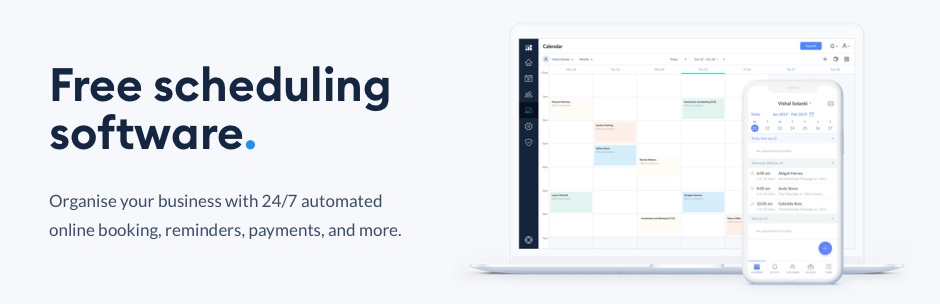
Setmore offers a free, online scheduling platform for you to connect with your customers.
Manage all your appointments through one simple, sleek calendar system and give
your business the freedom to grow.
Bring on more customers and sharpen your brand image, while taking charge of your
working hours. By listing your availability online, your customers can self-book
their desired services. Focus on providing an excellent customer experience and
let Setmore handle the paperwork.
#### How it works with WordPress
Setmore helps you deliver your magic. Turn your online visitors into customers with
the Setmore-Wordpress integration. Setmore provides a downloadable booking plugin
that you can add to your WordPress website. Place a ‘Book Now’ on any page and encourage
your online visitors to book an appointment. Don’t have a Setmore account? [Sign up for free and get started in minutes](https://www.setmore.com/integrations-start-now?utm_source=wordpress%20plugin%20directory&utm_medium=integrations&utm_campaign=wp_plugin_startfree)
#### What Setmore offers
Every Setmore account comes with a free online Booking Page where your customers
can schedule appointments with your business online. The Booking Page lists your
staff, services, and availability, and is customizable with your company logo and
contact information.
#### Sign up for free
Sign up for a free Setmore account at [www.setmore.com](https://www.setmore.com/?utm_source=wordpress%20plugin%20directory&utm_medium=integrations&utm_campaign=wp_plugin_home),
no credit card required. The Free version includes unlimited appointments, 100 email
reminders per month, and the iOS and Android app. Upgrade to Setmore Premium at
any time where you have access to advanced features such as SMS reminders, online
payments with Stripe & Square, and more.
Please click here for more information on [Pricing.](https://www.setmore.com/pricing?utm_source=wordpress%20plugin%20directory&utm_medium=integrations&utm_campaign=wp_plugin_pricing)
### Features
A memorable and meaningful experience starts with a connection. Make it straightforward
to connect with more customers by creating your **free, customizable Booking Page**.
Display your availability, services and pricing online, and accept appointments
24/7. Your customers are kept in the loop with automated booking reminders. And,
you receive instant updates across your desktop, tablet, **iOS** and **Android**
devices.
Make the world your stage by adding **1-click video meetings** to your appointments.
With Teleport.Video, you can connect with your customers from Anywhere. Ready for
your social media to work a little harder? With Setmore, your followers can book
appointments directly from your posts, at a time that suits them.
### FAQs
#### Does the Setmore plugin have any dependencies?
The Setmore plugin uses jQuery, jQuery easing, and FancyBox’s JavaScript and stylesheet.
We automatically register these scripts and stylesheets with WordPress as part of
the plugin.
#### Can I customize the way the ‘Book Now’ button looks?
Yes. While Setmore offers a default visual for your booking button, it is simply
an image file that links to your Booking Page. You can easily replace your button’s
image. Click [here](https://support.setmore.com/en/articles/490959-use-a-custom-book-now-button-image?utm_source=wordpress%20plugin%20directory&utm_medium=integrations&utm_campaign=wp_plugin_booknowbutton_article)
to learn how.
#### How can I add my company logo and contact details to my Setmore Booking Page?
Head to Apps & Integrations > Your Booking Page (Configure) > Company Details. Here,
you’ll be able to customize your Booking Page with your logo and contact details.
#### Can I remove the Setmore logo and branding from my Booking Page?
Yes. You can remove Setmore brand elements from your Booking Page by upgrading to
a Setmore Premium account. Once you upgrade, navigate to Apps & Integrations > Your
Booking Page (Configure) > Booking Policies. Scroll down and turn off the switch
for Setmore’s branding.
### Contributors & Developers
Setmore Appointments was built by experts in the business productivity software
industry.
## Screenshots
* [[
* Once the Setmore Wordpress Plugin is installed and configured, you’ll see the“
Book Appointment” button on your blog page.
* [[
* Clicking the “Book Appointment” button displays the booking page that helps customers
initiate the booking process.
* [[
* Once the Setmore Wordpress plugin is added and installed, the plugin appears
under “Plugins.” Click “Activate” to get started.
* [[
* Click the “Setmore Icon” in the left sidebar. Either log in or sign up if you
do not have a Setmore account. Once done, make sure to hit “Save Changes.”
* [[
* Navigate to Appearance > Widgets and find the Setmore Appointments Widget.
* [[
* Drag this widget to Main Sidebar on the right, or into whichever sidebar you’d
like it included within. Once done, the “Book Appointment” button will start
to appear on your Wordpress powered website.
* [[
## Installation
Follow the instructions below to download, install, and activate the Setmore plugin
for WordPress. If you hit any snags, email [help@setmore.com](https://af.wordpress.org/plugins/setmore-appointments/help@setmore.com?output_format=md)
or message support from inside the Setmore app.
Before you begin, make sure you already have a Setmore account. Don’t use Setmore?
[Sign up here ](https://www.setmore.com/integrations-start-now?utm_source=wordpress%20plugin%20directory&utm_medium=integrations&utm_campaign=wp_plugin_startfree)
#### Download and install the plugin
1. Click the download button on this page, then unzip the file on your computer.
2. Upload the “setmore-appointments” folder to the /wp-content/plugins directory.
Do not change the folder name, otherwise the plugin may not work correctly.
3. In the WordPress dashboard, navigate to the Plugins menu and activate the Setmore
plugin.
#### Link the plugin to your Booking Page
1. In the WordPress dashboard, navigate to the Setmore Icon in the left sidebar.
2. Login with your Setmore credentials or “Sign Up” for a new account.
3. Once you are logged in, your booking page URL and Language drop-down will be shown.
Select your preferred language from the drop-down menu.
4. Make sure to click “Save Changes.”
#### Adding the Setmore widget to your website
1. In the WordPress dashboard, navigate to Appearance > Widgets.
2. Click on the Setmore widget and select an area to install the widget, or drag and
drop the Setmore widget into an available area of your template.
3. The “Book Appointment” button will appear in the chosen area of your website.
## Aanbevelings

### [It works terribly](https://wordpress.org/support/topic/it-works-terribly-2/)
[noteimporta](https://profiles.wordpress.org/martae85/) Mei 15, 2023
It works terribly. First I wanted to log in with my client’s email but as my gmail
was open it linked to it automatically without any authorization, I doubt it is
legal to do that. Once logged in, it forces me to set up but it doesn’t work well
and I have no way to go out from there. I am in a loop with no way out.

### [Good plugin](https://wordpress.org/support/topic/good-plugin-5794/)
[Earnie Rhyker](https://profiles.wordpress.org/rhyker2u/) Maart 31, 2023
Does what it’s supposed to do. More customization options,
a shortcode and/r translatable interface would be nice. Sent a support ticket about
this to Setmore about 6 months ago, and where their support department is stellar
in all other areas, WP ain’t of them.

### [Simple. Fast. Easy](https://wordpress.org/support/topic/simple-fast-easy-2/)
[verdographics](https://profiles.wordpress.org/verdographics/) Mei 5, 2022
Great booking app

### [bait](https://wordpress.org/support/topic/bait-3/)
[zaraka](https://profiles.wordpress.org/zaraka/) April 15, 2022
signup required, not possible to configure, no options
[ Read all 4 reviews ](https://wordpress.org/support/plugin/setmore-appointments/reviews/)
## Contributors & Developers
“Setmore Appointments” is oopbron sagteware. Die volgende mense het bygedra tot
die ontwikkeling van hierdie uitbreiding:
Contributors
* [ davidfull ](https://profiles.wordpress.org/davidfull/)
* [ Anitha ](https://profiles.wordpress.org/anitha/)
* [ sankavi ](https://profiles.wordpress.org/sankavi/)
[Translate “Setmore Appointments” into your language.](https://translate.wordpress.org/projects/wp-plugins/setmore-appointments)
### Interested in development?
[Browse the code](https://plugins.trac.wordpress.org/browser/setmore-appointments/),
check out the [SVN repository](https://plugins.svn.wordpress.org/setmore-appointments/),
or subscribe to the [development log](https://plugins.trac.wordpress.org/log/setmore-appointments/)
by [RSS](https://plugins.trac.wordpress.org/log/setmore-appointments/?limit=100&mode=stop_on_copy&format=rss).
## Changelog
11.3 UI updation related to short code
11.0 1.UI updates
2.Supporting Onboard flow inside WordPress 10.4 1.setmore url
and content update 10.1 1.Content and logo updates
4.1 1. Design changes for the settings panel.
2. Updated screenshots and readme.
txt.
4.1 1. Added Auth Flow
4.0
1. Updated plugin with Oauth 2.0 authentication
3.0
```
1. Show Category Like Accordion
2. Load appointment slots in Local time
3. Few design fixes
```
2.0
1. Updated booking page version 2. Removed the fancy box plugin due to conflicts
1.1
1. Added expandable lists for service categories. 2. The Booking Page will
automatically convert available times to match the customer’s time zone. 3. Some
minor design fixes.
1.0 This is the first iteration of the plugin.
## Meta
* Version **12.5**
* Last updated **11 maande gelede**
* Active installations **4 000+**
* WordPress version ** 3.7.2 or higher **
* Tested up to **6.8.5**
* Language
* [English (US)](https://wordpress.org/plugins/setmore-appointments/)
* Tags
* [appointments](https://af.wordpress.org/plugins/tags/appointments/)[booking](https://af.wordpress.org/plugins/tags/booking/)
[Free](https://af.wordpress.org/plugins/tags/free/)[scheduling](https://af.wordpress.org/plugins/tags/scheduling/)
* [Gevorderde Aansig](https://af.wordpress.org/plugins/setmore-appointments/advanced/)
## Punte-toekennings
2.5 out of 5 stars.
* [ 1 5-star review ](https://wordpress.org/support/plugin/setmore-appointments/reviews/?filter=5)
* [ 0 4-star reviews ](https://wordpress.org/support/plugin/setmore-appointments/reviews/?filter=4)
* [ 1 3-star review ](https://wordpress.org/support/plugin/setmore-appointments/reviews/?filter=3)
* [ 0 2-star reviews ](https://wordpress.org/support/plugin/setmore-appointments/reviews/?filter=2)
* [ 2 1-star reviews ](https://wordpress.org/support/plugin/setmore-appointments/reviews/?filter=1)
[Your review](https://wordpress.org/support/plugin/setmore-appointments/reviews/#new-post)
[See all reviews](https://wordpress.org/support/plugin/setmore-appointments/reviews/)
## Contributors
* [ davidfull ](https://profiles.wordpress.org/davidfull/)
* [ Anitha ](https://profiles.wordpress.org/anitha/)
* [ sankavi ](https://profiles.wordpress.org/sankavi/)
## Hulp
Got something to say? Need help?
[Gaan na die hulp-forum](https://wordpress.org/support/plugin/setmore-appointments/)