Beskrywing
Celestial Lunar Phase Widget helps WordPress sites display the current moon phase in a polished astronomy card.
The plugin shows:
- Current lunar phase name
- Moonrise time
- Moonset time
- Illumination percentage
- Bundled moon phase image matched to the returned phase
- Optional location label
- Optional WeatherAPI credit line
It includes both a classic shortcode and a Gutenberg block, so site owners can add lunar data in the editor or in traditional content areas.
Ideal for
- Astronomy and space science websites
- Observing clubs and public outreach pages
- Weather and nature blogs
- Classroom and education sites
- Hobbyist websites that want a live moon phase widget
Key features
- Shortcode:
[celestial_lunar_phase_widget] - Gutenberg block: Celestial Lunar Phase Widget
- Eight bundled moon phase photos packaged locally
- Default location and title settings
- 12-hour or 24-hour time display
- Per-location and per-date caching for better performance
- No visitor geolocation in the browser, so your API key stays server-side
Support
Support and documentation are available at:
https://celestialwebdevelopment.com/lunar-phase-plugin/
Blocks
Celestial Lunar Phase Widget
Display the current moon phase with a bundled moon image, phase name, moonrise, moonset, and illumination.
External Services
This plugin connects to the following external service:
WeatherAPI
- Service URL:
https://api.weatherapi.com/v1/astronomy.json - What the service does: Returns moon phase, moonrise, moonset, and illumination data for the requested location and date.
- When data is sent: Only when the block or shortcode is rendered and no cached response is available.
- What data is sent: The site administrator’s WeatherAPI key, the configured location or override location, and the selected date.
- Service provider: WeatherAPI
- Terms of use:
https://www.weatherapi.com/terms.aspx - Privacy policy:
https://www.weatherapi.com/privacy.aspx
Screenshots
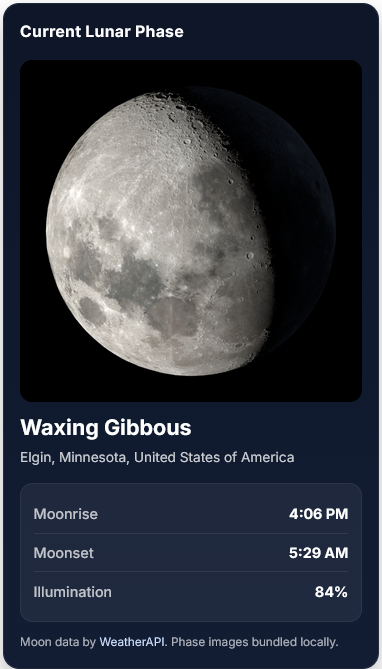
Front-end widget showing the current lunar phase, location, moonrise, moonset, and illumination. 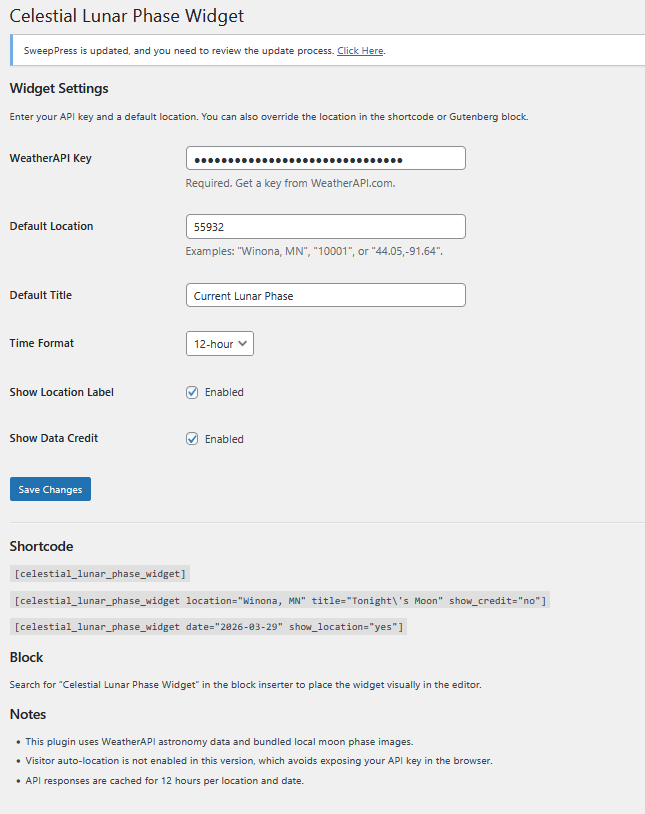
Settings screen for WeatherAPI key, default location, time format, and shortcode examples.
Blokke
This plugin provides 1 block.
- Celestial Lunar Phase Widget
Installation
- Upload the plugin folder to
/wp-content/plugins/or install the ZIP from Plugins > Add New > Upload Plugin. - Activate the plugin.
- Go to Settings > Celestial Lunar Phase Widget.
- Enter your WeatherAPI key.
- Set a default location.
- Add the Celestial Lunar Phase Widget block or place
[celestial_lunar_phase_widget]into a post, page, or widget area.
Kwel-vrae
-
Does the plugin include moon images?
-
Yes. Eight moon phase images are bundled locally inside the plugin package.
-
Does the plugin include a Gutenberg block?
-
Yes. Version 1.1.0 includes a dynamic Gutenberg block with editor controls for location, date, title, and display options.
-
Does the plugin need an API key?
-
Yes. The plugin uses WeatherAPI to retrieve moon phase, moonrise, moonset, and illumination data.
-
Does the plugin auto-detect each visitor location?
-
No. This version uses the saved default location or a block/shortcode override.
-
Where can I get support?
-
Support is available at:
https://celestialwebdevelopment.com/lunar-phase-plugin/
Aanbevelings
There are no reviews for this plugin.
Contributors & Developers
“Celestial Lunar Phase Widget” is oopbron sagteware. Die volgende mense het bygedra tot die ontwikkeling van hierdie uitbreiding:
Contributors
Translate “Celestial Lunar Phase Widget” into your language.
Interested in development?
Browse the code, check out the SVN repository, or subscribe to the development log by RSS.
Changelog
1.1.0
- Added a dynamic Gutenberg block with editor preview.
- Added WordPress.org screenshot assets and improved submission readme.
- Updated plugin author, support, and company branding to Celestial Web Development.
1.0.0
- Initial release.