

Beskrywing
The Code and Core Remove Empty P Tags is a powerful yet lightweight plugin that helps you eliminate unwanted spacing in your WordPress content. With version 2.0.0, we’ve introduced complete flexibility with two cleanup modes:
- Frontend Cleanup (Recommended): Automatically cleans content as it’s displayed on your site. This is non-destructive, meaning your database remains untouched while your visitors see perfectly clean content.
- Backend Cleanup (Editor-based): Adds a checkbox to your post/page editor. When checked, content is cleaned and saved directly to the database.
What it removes:
- Empty paragraph tags.
- Paragraphs containing only non-breaking spaces.
- Empty paragraphs with line breaks.
- Multiple consecutive line breaks (collapses them into one).
Key Features
- Frontend & Backend modes: Choose between site-wide display cleanup or permanent database cleanup.
- Block Editor (Gutenberg) Support: Fully compatible with the modern WordPress editor.
- Classic Editor Support: Continued support for the traditional TinyMCE editor.
- ACF Support: Clean up content in Advanced Custom Fields (WYSIWYG and Textarea).
- Custom Post Types: Enable cleanup for any public post type on your site.
- Exclude Post IDs: Easily skip cleanup on specific pages or posts.
- Lightweight: Minimal impact on site performance.
Privacy Policy
This plugin does not collect, store, or process any personal or user-identifiable information without the site administrator’s explicit consent.
Telemetry Consent
To help improve plugin stability and ensure safe updates, you can opt-in to send minimal anonymous technical information (WordPress version, PHP version, theme locales) to our server.
No personal data, user emails, or IP addresses are collected. Opting in is 100% voluntary and can be disabled at any time from the settings page.
Screenshots

The new Settings Page with Frontend/Backend toggle and Post Type selection. 
Privacy & Telemetry settings for transparent data sharing. 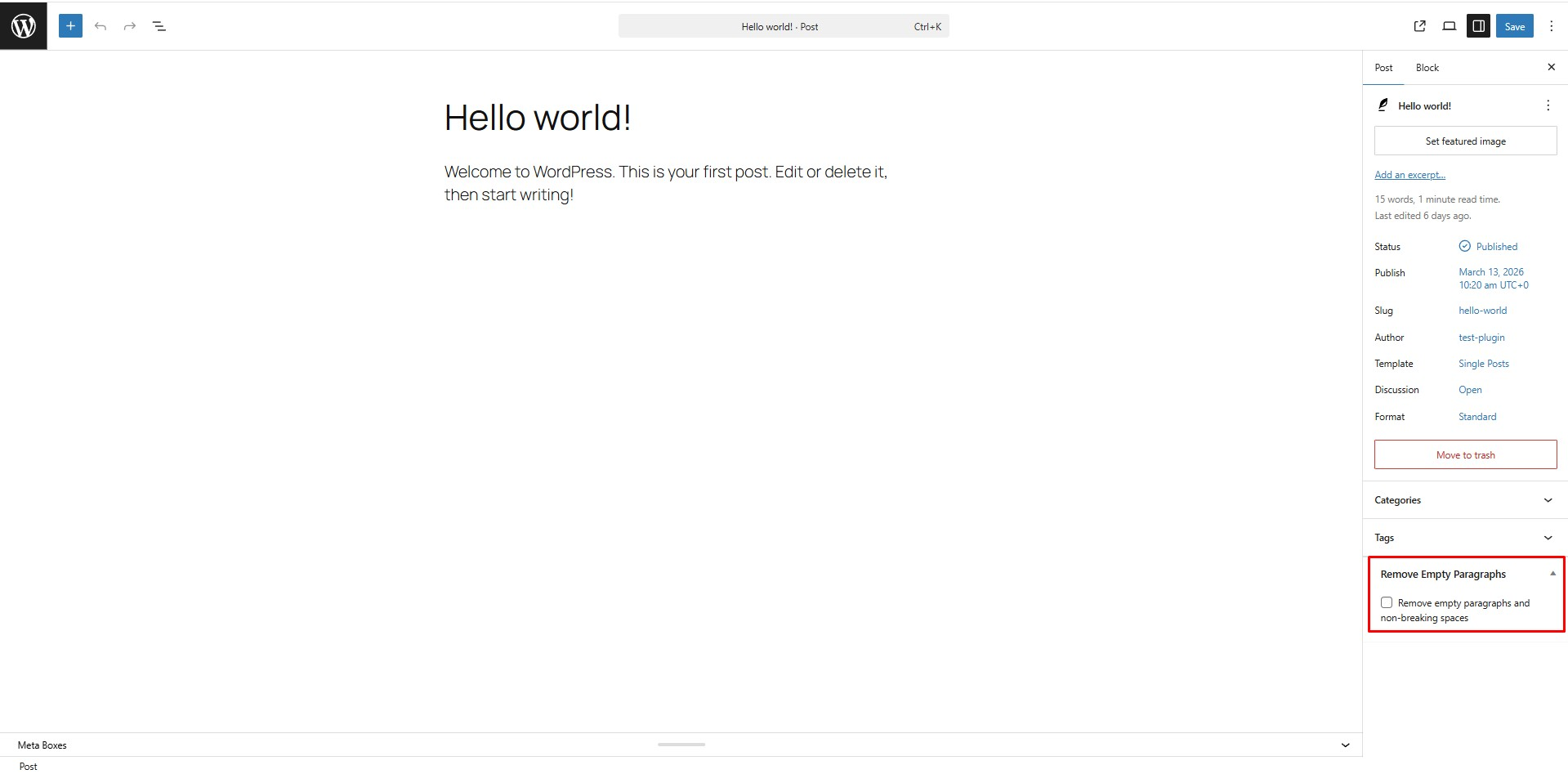
Backend mode: The cleanup checkbox in the post editor sidebar. 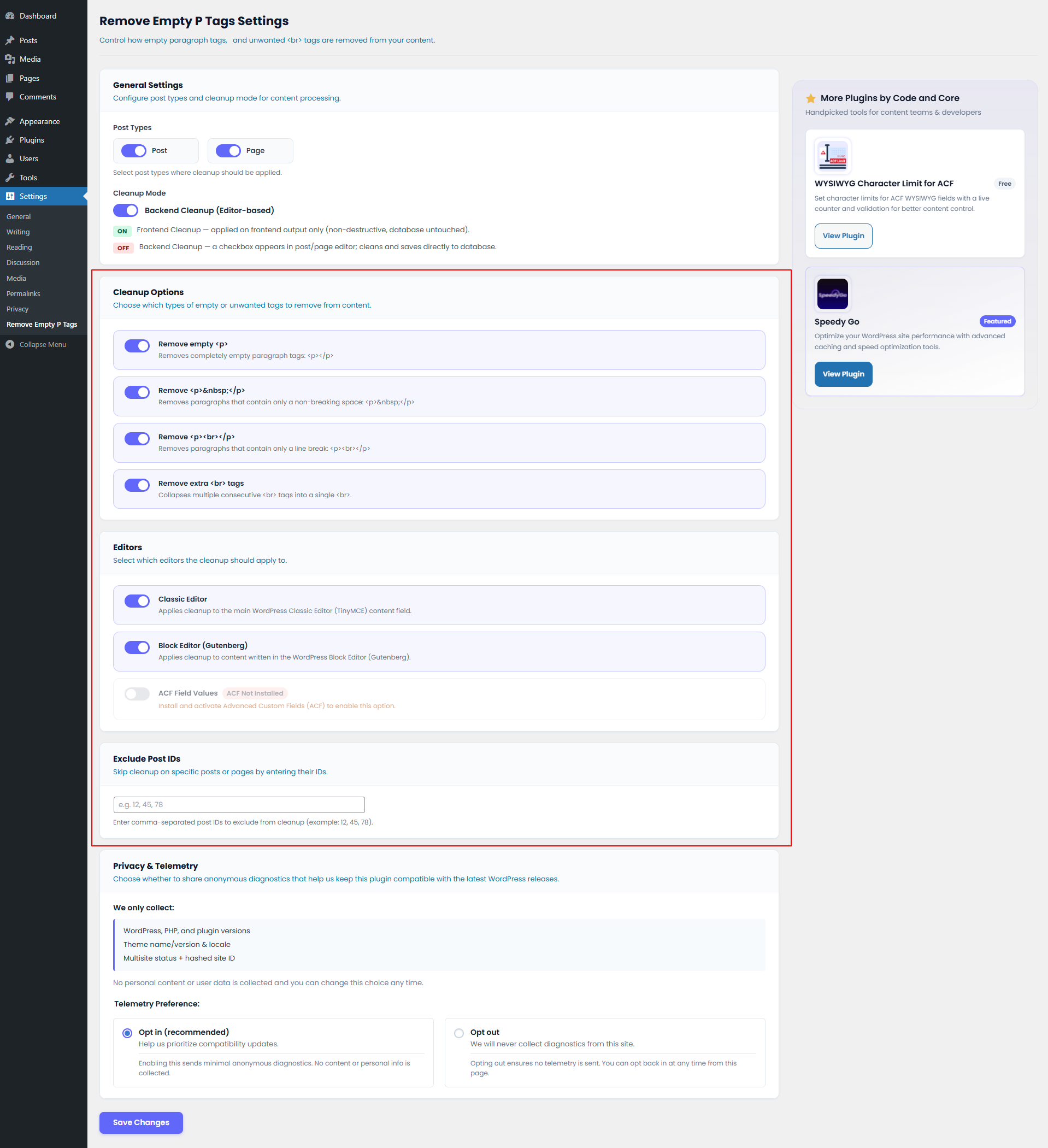
Frontend mode: Clean output without touching the database.
Installation
- Upload the
code-and-core-remove-empty-p-tagsfolder to/wp-content/plugins/. - Activate the plugin in the Plugins menu.
- Navigate to Settings > Remove Empty P Tags to configure your cleanup preferences.
- Choose your preferred mode (Frontend or Backend) and select the post types to clean.
Kwel-vrae
-
Does the plugin work with the Block Editor (Gutenberg)?
-
Yes! Version 2.0.0 fully supports the Block Editor. You can enable or disable this in the settings.
-
Can I use it for Custom Post Types?
-
Yes. You can select which post types (including CPTs) should be processed in the plugin settings.
-
Does it support ACF?
-
Yes. There is a built-in option to clean Advanced Custom Fields content.
-
What is the difference between Frontend and Backend modes?
-
Frontend mode cleans the content on-the-fly when a visitor views the page (non-destructive). Backend mode requires you to check a box in the editor to clean and save the changes permanently to the database.
Aanbevelings
There are no reviews for this plugin.
Contributors & Developers
“Code and Core Remove Empty P Tags” is oopbron sagteware. Die volgende mense het bygedra tot die ontwikkeling van hierdie uitbreiding:
Contributors
Translate “Code and Core Remove Empty P Tags” into your language.
Interested in development?
Browse the code, check out the SVN repository, or subscribe to the development log by RSS.
Changelog
2.0.1
- Strict Privacy: Enforced strict telemetry privacy. No diagnostic data is sent if the user has opted out, including deactivation and uninstall events.
2.0.0
- Major Overhaul: New settings page for full control.
- Frontend Mode: Added non-destructive site-wide cleanup.
- Gutenberg Support: Added compatibility with the Block Editor.
- ACF Integration: Added support for cleaning Advanced Custom Fields.
- Post Type Selection: Now supports Custom Post Types.
- Telemetry: Added anonymous diagnostic tracking (opt-in) to improve stability.
- Code Standards: Refactored entire codebase to follow WordPress naming conventions.
1.0.0
- Initial release.
- Added editor checkbox for removing empty paragraph tags and non-breaking spaces during post save.